Digital menu with QR CodeLive the same day

A digital menu that is always ready for your café or restaurant

Update your menu in seconds and let guests always see your latest prices, photos and dishes — with nothing more than a QR scan.

  • No reprinting, ever
  • Instant price and item updates
  • Opens straight from a QR Code
  • Table reservations and waiter paging

Why go digital?

Your menu should always be current, polished and ready to sell — not something where every small change costs you time and money.

MENU

The paper menu

Dated · costly · tiring

  • Every price or item change means another print run, and another bill

  • The menu slowly gets grubby, worn and hard to read

  • Removing an item or marking it sold out takes real effort

  • A dated experience that doesn't match the quality of your brand

Every change = another print run
The Hesabesh digital menu

Modern · live · effortless

  • Updated in seconds

    Change a price, a photo or a dish description whenever you need to.

  • Always clean and polished

    A readable menu that's always to hand — no wear, no reprinting.

  • Sold out, instantly

    The moment something runs out, hide it or mark it unavailable for guests.

  • Looks like your brand

    Build a modern, consistent experience with a range of themes.

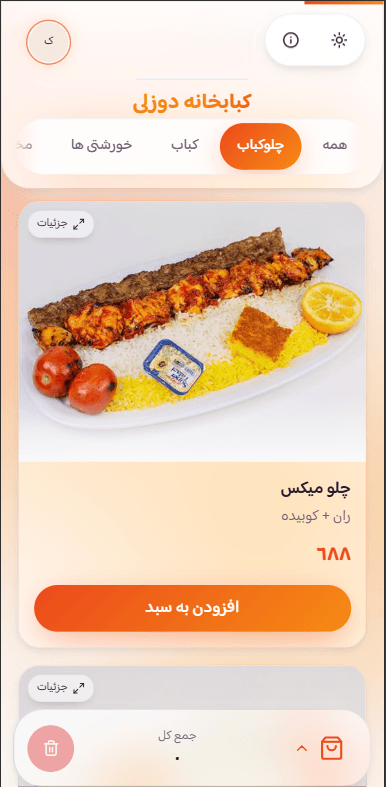
Preview of the Hesabesh digital menu

Part of the Hesabesh digital menu

A loyalty club and a prize wheel, inside the same digital menu

The Hesabesh digital menu is more than a menu online. A guest who scans the QR on the table can spin the prize wheel right there, join your loyalty club, and walk away with a reason to come back.

  1. Step ۱Scan the QR on the table
  2. Step ۲Browse the digital menu
  3. Step ۳Open the prize wheel
  4. Step ۴Leave a name and number
  5. Step ۵Collect a prize
  6. Step ۶Come back again

Every guest who opens the menu can join the club

Your café or restaurant's loyalty club lives inside the same dashboard as the menu. There's no separate system to buy and no customer details to write down by hand.

  • Customer details, captured

    The name and phone number of every guest who spins the wheel is saved to your loyalty club automatically, along with where they came from — the digital menu, a table, or Instagram.

  • Campaigns and prizes

    Build campaigns for occasions and quiet days, define the prizes, and cap each one with a stock limit and an expiry.

  • Growth and return reporting

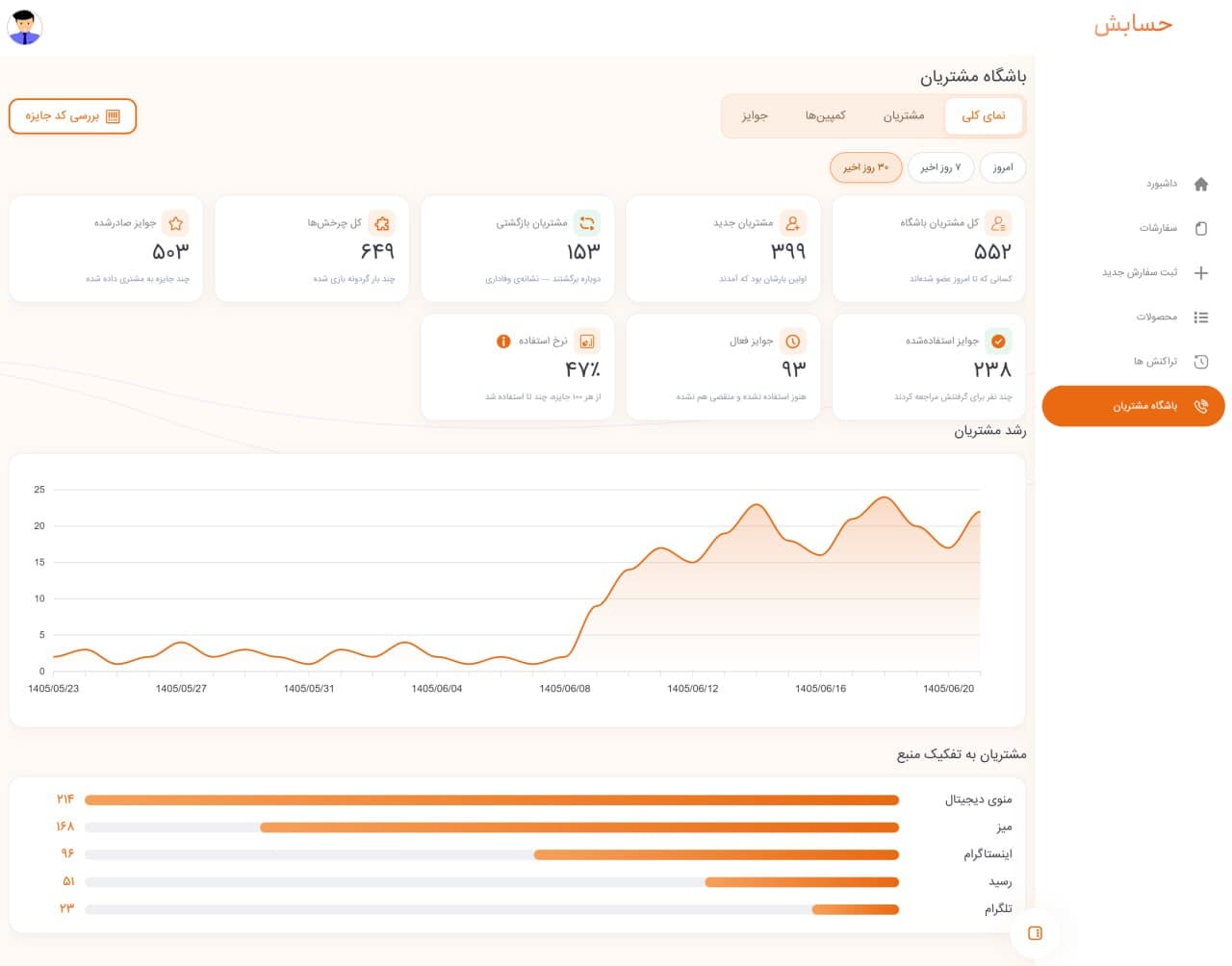
    See how many new customers you gained, how many came back, and which prize actually brought them through the door again.

The Hesabesh loyalty club dashboard — customer counts, prizes issued and the customer growth chart
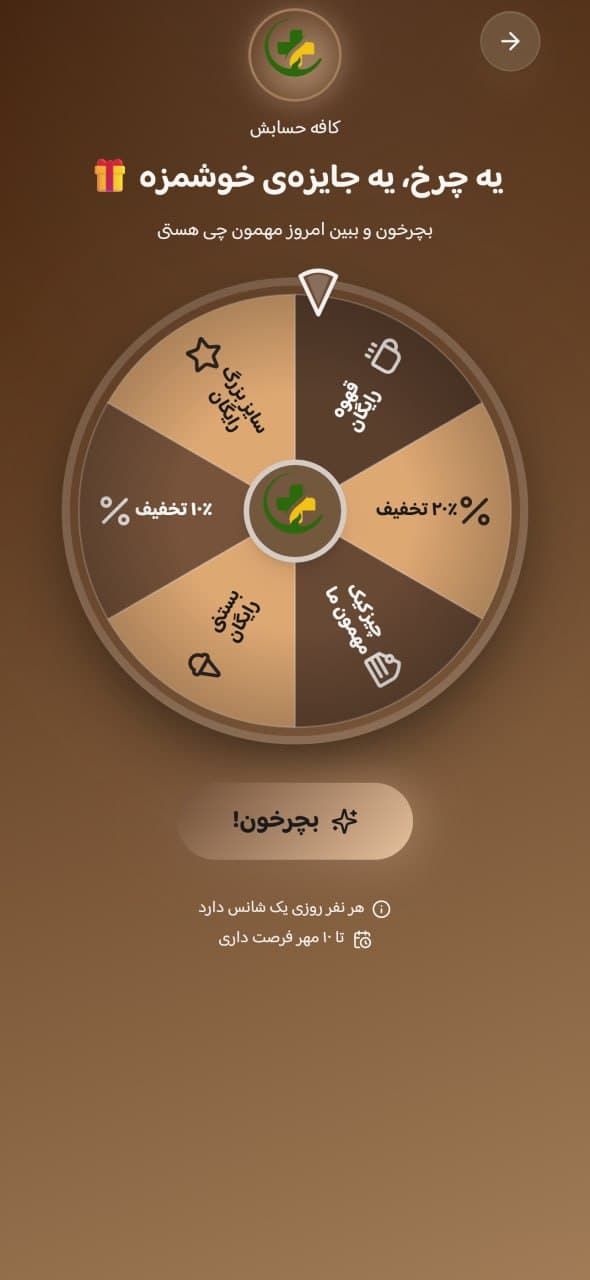
The Hesabesh prize wheel on a guest's phone, showing café prizes

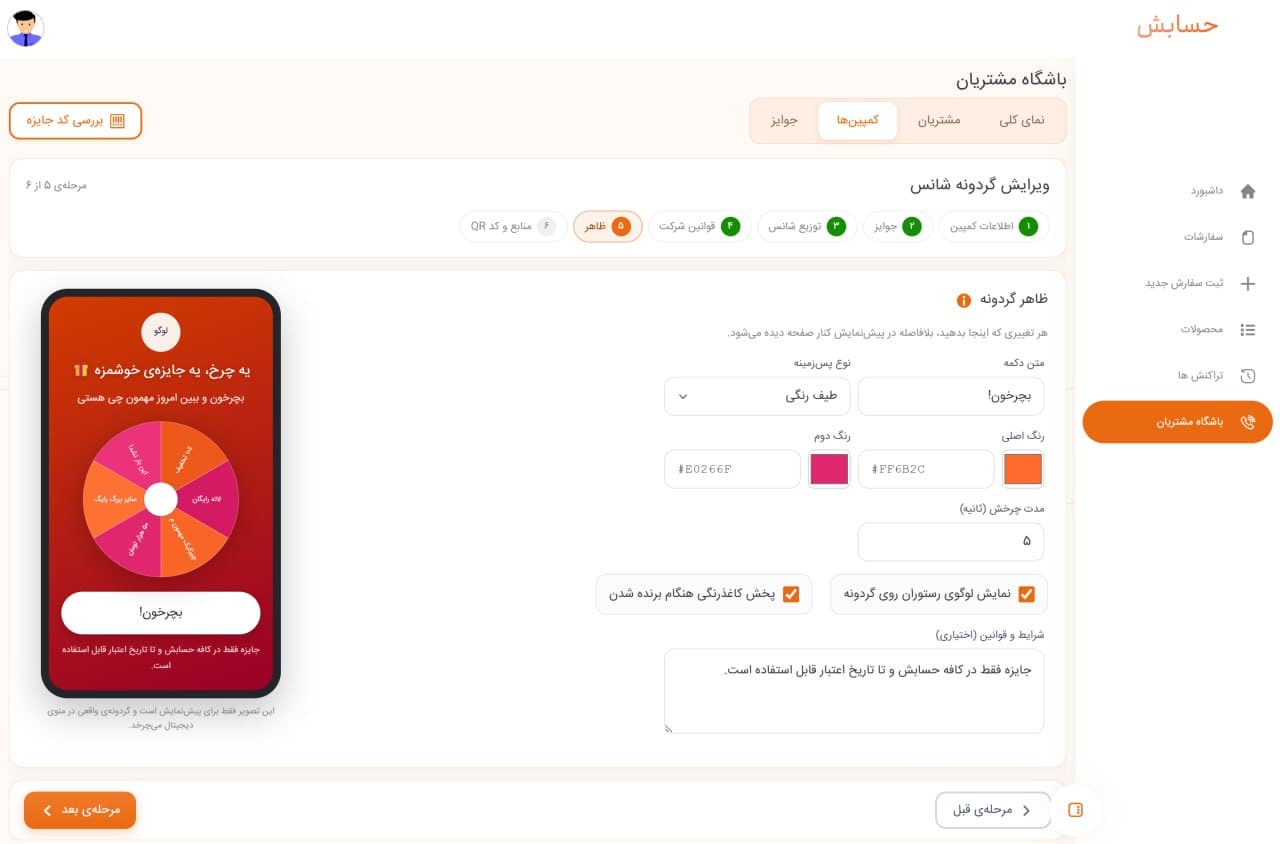
The wheel's colours, background and button text are fully customisable — build any palette that fits your brand, right in the dashboard.

One QR Code, one prize wheel, one memorable moment

The guest scans the QR, spins the wheel, leaves a phone number and collects a prize. Those few seconds are fun for them — and turn an anonymous visitor into a customer you know.

  • One scan to enter

    The same QR Code as the digital menu, or a dedicated wheel QR for tables and the till.

  • You set the prizes and the odds

    Choose the prize types, how many there are, and the win chance for each segment.

  • Prize codes you can verify

    The guest receives a prize code, and you check and redeem it in the dashboard when they visit.

From building a campaign to reading the results

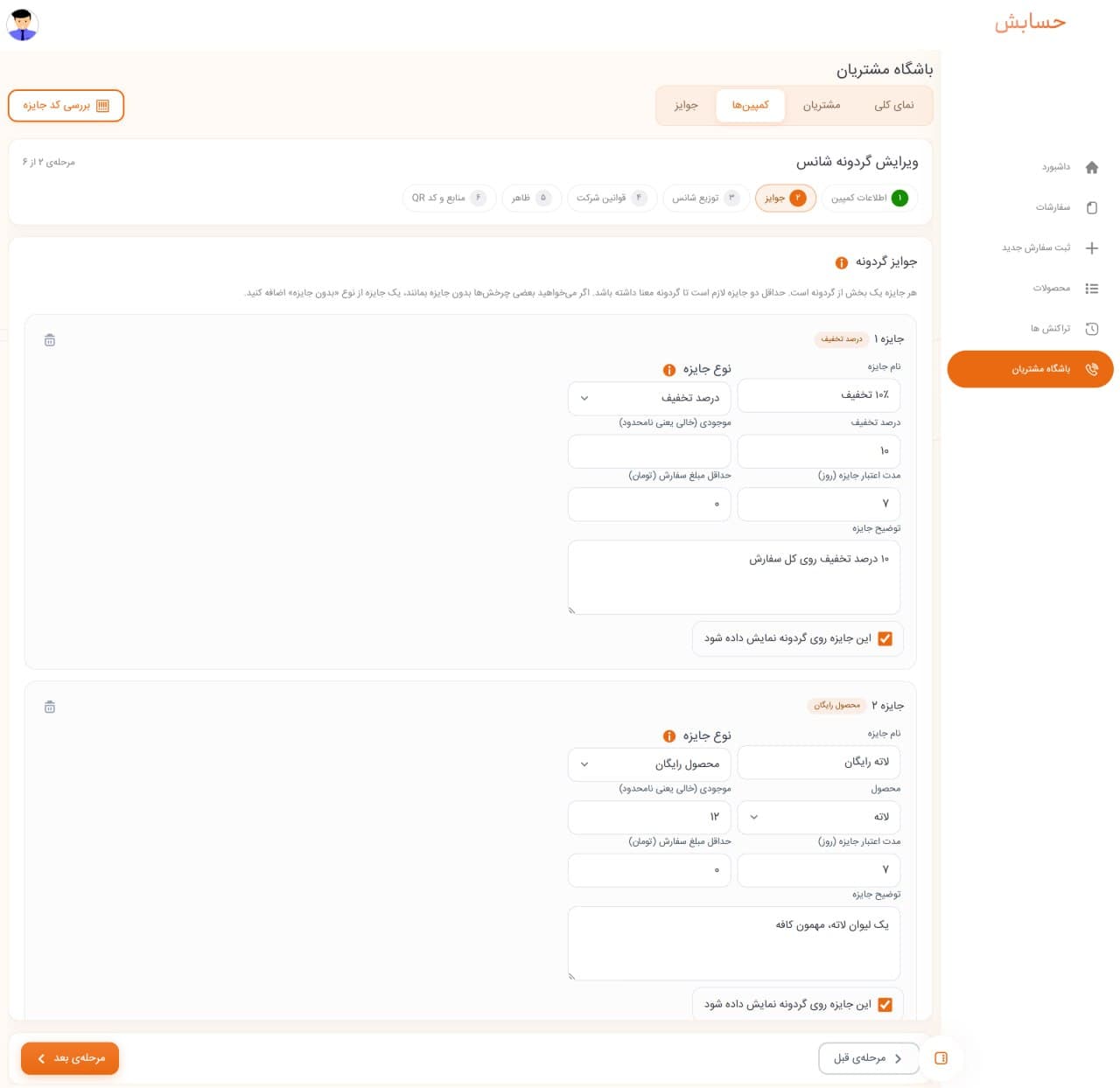
Building a prize wheel campaign and defining prizes in the Hesabesh loyalty dashboard
Build a campaign and set the prizes
Setting the prize wheel's look, colours and entry QR Code in the Hesabesh dashboard
Wheel styling and the entry QR Code
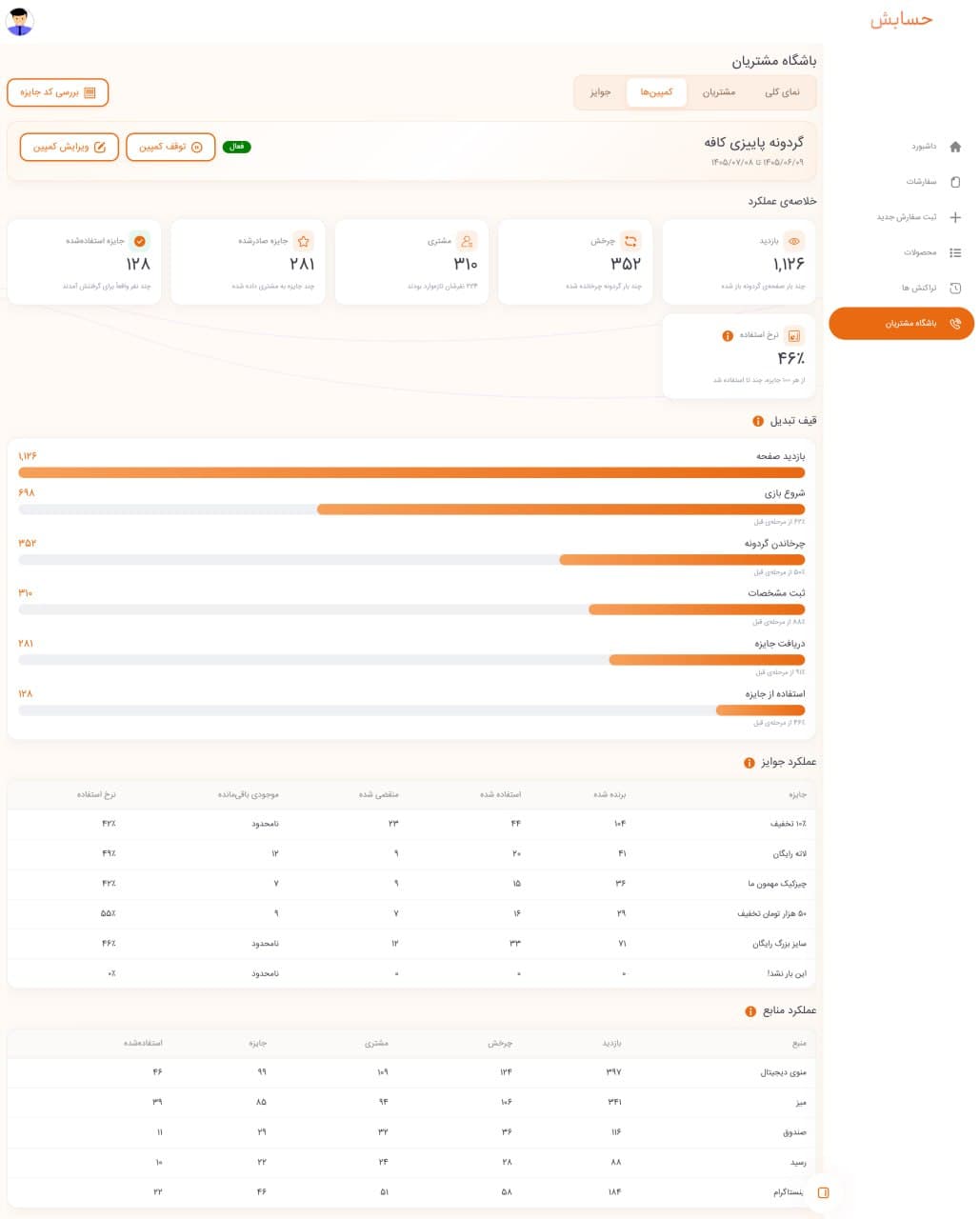
Prize wheel campaign report showing visits, spins and prizes redeemed
Campaign results and repeat visits
Get started

The loyalty club and prize wheel are part of the digital menu itself. To see the plans, take a look at digital menu pricing. And if sales and till management matter to you too, Hesabesh accounting software works alongside the same menu.

New

Table reservations and waiter paging, from the same QR on the table

Set up your tables in the Hesabesh dashboard and run everything from there — manage reservations and speed up service at the table, with no paper booking diary and no separate app.

Table reservations

Run every table booking in one place

See the day's bookings for each table at a glance, add or cancel a reservation, and let the system stop two bookings landing on the same table at the same hour.

Waiter paging

Guests call a waiter with one tap

Every table has its own QR. A guest calls a waiter from inside the menu and the request lands instantly on the dashboard and the waiter's phone — no shouting, no waiting.

  • A dedicated QR for every table
  • Instant alerts for the waiter
  • A separate access level for waiters
  • No extra cost

Up and running in 3 steps

Getting your Hesabesh menu live takes three steps, and our team walks you through every one of them — so your menu is ready without any hassle.

  1. 1

    Send a request

    Fill in the request form. Our team calls you to agree the details and get you set up.

  2. 2

    We build your menu

    Your digital menu, your dashboard and your own QR Code are prepared and handed over.

  3. 3

    Ready to serve

    Put the QR Code on the table, and one scan shows every guest your latest menu.

A menu that matches your brand

Pick a look that suits your restaurant, café or fast-food spot. Try the themes right here and watch the result on a phone as you go — and change it from the dashboard whenever you like.

Choose a theme

Display mode

You can change the menu theme from the dashboard at any time.

Autumn — Light

Your plan

Everything included, in one annual subscription

No confusing bundles, no features held back. Everything you need to launch and run your digital menu comes in a single complete plan.

Every feature, no limitsLive the same day

Hesabesh digital menu

5,900,000Toman / one year

  • Your own dashboard with secure sign-in
  • A dedicated link and QR Code for your venue
  • Unlimited edits to prices, photos and menu details
  • Switch the menu theme and look whenever you like
  • Table management with a dedicated QR per table
  • Table reservations and waiter paging from inside the menu
  • Support for the whole subscription
Get started

Payment is not taken online. Once you send a request, the Hesabesh team calls you to confirm the details and finalise the order.

Frequently asked questions

The questions people usually ask us before ordering.

If your question isn't answered here, just send a request — the Hesabesh team will call and walk you through it.

Your guest scans a QR Code and your menu opens straight in their phone's browser — no app to install. Any change you make is visible to every guest immediately.

Live the same day

Put the paper menu away

Send a request today and your venue's digital menu can be live the same day.